


Show Real Delivery Times on Shopify Product Pages to Improve Conversion Rate
 Author: Joe
If you use Amazon Multi Channel Fulfillment to ship your Shopify orders, here's a quick conversion booster:
🚚 Show the exact delivery date on the product page.
That's what Order Automator's Amazon Delivery Badge does.
Instead of a generic message like "Ships fast” or "Delivery in 3 - 5 days,” shoppers can enter their postal code and see an accurate delivery estimate.
Here's what it looks like:
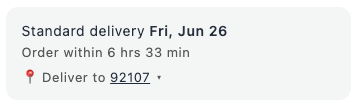
Amazon calls this the MCF Fast Badge, and you can use it on your Shopify store to show the order cutoff time and delivery date.
If you already use Amazon inventory to fulfill Shopify orders, this is a nice upgrade because it turns Amazon's fast delivery speed into higher conversions (see case studies below).
👀 If you're not using Amazon to fulfill Shopify orders check this out
Fulfilling your Shopify store orders via Amazon is called Multi Channel Fulfillment (aka Amazon MCF). This works by sending inventory to Amazon fulfillment centers and connecting your Shopify store to Amazon.
Benefits:
- Automate fulfillment
- Fast shipping 2-3 business days (FAQ here)
- Deliveries made 7 days a week with a 96% average on-time delivery
- 99.98% undamaged package delivery rate
- Special pricing incentives for 2026 (save up to 15% on outbound fulfillment fees + the ability to earn up to $1 in FBA credit per unit shipped, see Preferred Pricing here)
If you're on Shopify and want to automate your fulfillment with Amazon, check out Order Automator app or send a message to set up a demo.
Why Show Real-Time Delivery Estimates on Product Pages?
Shipping speed and easy information affect conversion rate.
Showing a delivery estimator instantly, for the customer's location, makes it easy to purchase a product they're interested in.
People are used to seeing this information when shopping on Amazon, give them the same benefit on your store.
Show Better Shipping Times
It's common to have shipping information on a page, and many stores show right in the product box.
Generic examples in the product box:
- "Fast shipping”
- "Ships with X days”
- "Estimated delivery 3–7 days”
Those help, but compare with delivery on an exact date like this:
✅ Nice.
A delivery badge is stronger because it's closer to the customer's actual question. They don't just want to know your handling time. They want to know when the order will arrive at their location.
Stats + Case Studies
Here are published case studies showing how adding delivery badges like this to product pages improves conversion rate.
1. Meeting shopper expectations across sales channels
Relevant highlights:
- Conversion rate increased 8% after adding fast delivery estimates to product pages (A/B tested)
- Amazon’s fulfillment network has an average click-to-door speed of 1.9 days
2. Scaling operations to support an omnichannel strategy
Relevant highlights:
- 55.9% uplift in website conversion rate using these MCF fast badges
- 1.5 day average delivery time using Amazon MCF for DTC orders
⚠️ Side note: I wouldn't expect 50% increase in conversion rate, but very cool that it happened for someone.
3. Showcase your fast delivery speeds on Google
Relevant highlights:
- Amazon cites a Google study showing that US Google Shopping ads with "Free 3-Day" shipping or faster saw a 1.5%–7.6% increase in clicks
- This doesn't track Shopify product pages, but same concept of adding fast shipping badge increasing actions
ℹ️ Your results may vary, but I'm betting this will improve conversion rates given that Amazon studied and tested this feature. Either way, it's a better customer experience, and that's always good right?
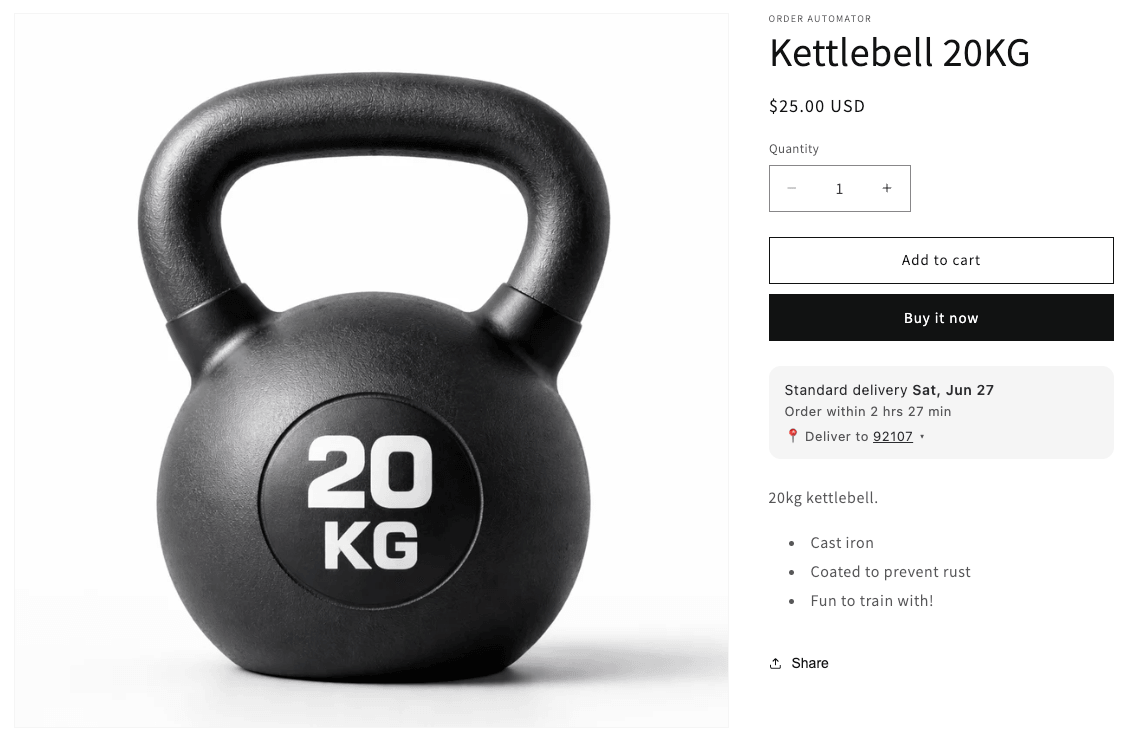
What it looks like on the product page
Here's what it looks like on a product page after you've entered the zip code:
Practical example
Let's say you sell travel accessories like chargers, bags, and gadgets on Shopify and fulfill them through Amazon MCF.
A shopper lands on your product page on Monday. They need new gear for a trip this weekend.
Without the badge, they might wonder:
- Will this arrive by Friday?
- Do I need to pay for faster shipping?
- Is this store shipping from a small warehouse?
- Should I just buy from Amazon instead?
With the badge, they can enter their postal code and see the estimated delivery date right on the product page.
That one piece of information could keep the sale on your store. Boom! 👍
How the Amazon Delivery Badge works in Order Automator
Order Automator already helps Shopify stores connect to Amazon for inventory sync and fulfillment.
With the Amazon Delivery Badge, you can add the delivery estimate widget to your Shopify product pages for Amazon fulfilled products.
At a high level:
- Your Shopify store has products connected to Amazon inventory via Order Automator.
- You add the badge to your Shopify product page.
- A shopper enters their zip code.
- The widget displays an estimated delivery date for that product.
Setup checklist
Setup is easy if you're using Order Automator.
- Connect your Shopify store to Amazon
- Configure the SKUs that will sync with Amazon inventory and get fulfilled
- Enable the Amazon Delivery Badge in Order Automator
- Add the Order Automator badge block in your theme customizer to show it where you want
These 2 reference docs are all you need for quick setup:
Tips
Put the badge close to the buying decision
I would put it near the Add to Cart button. Test adding above or below and see what you like best.
Track conversion impact
Before enabling the badge, consider noting some baseline metrics for the products you're testing:
- Product page conversion rate
- Add to cart rate
- Support tickets about shipping speed
Then enable and compare the stats.
For smaller stores, you might need a few weeks of data. For larger stores, check in when you get 100+ pageviews.
For agencies and consultants
Amazon MCF + the Amazon Delivery Badge is a strong combo to help your customers improve their conversion rate.
Fulfillment can be overlooked when doing conversion rate optmization, but data shows that fast shipping + showing that clearly improve conversion rates.
It's a small feature, but it touches conversion, fulfillment, and customer experience.
Order Automator processes millions of orders per month, we have workflows like this dialed in. 💪
Contact us if you want to kick ideas on how we can help you help your customers.
FAQ
Is this the same as Amazon's MCF Fast Badge?
Yes. Amazon commonly refers to this as the MCF Fast Badge. In Order Automator, we call it the Amazon Delivery Badge.
Is this available everywhere?
Not yet. As of this writing it's available to show for inventory synced with Amazon US marketplace only.
For non-US customers contact us to make a request. We'll see what options are available and might even be able to create a custom widget for you.
Is there any Amazon branding on the badge?
No. This operates as a simple interactive widget on your product page, no branding.
How much does this cost?
Check the Order Automator app listing in the Shopify app store, this feature is included in any plan with the Amazon feature.
If you're not yet using Amazon MCF, see Amazon's pricing calculator here to get an idea on per unit cost.
Final thoughts
If you already use Amazon MCF to fulfill Shopify orders, add the Amazon Delivery Badge to advertise your fast shipping and potentially improve conversion rates.
If you're not using Amazon MCF check out Amazon's pricing doc and consider automating your store's fulfillment with Amazon + Order Automator.
If you have questions or ideas, send a message or drop a comment below. We love hearing from the community and are always building features based on real Shopify operator feedback. ✊
🧙♂️ If you liked this post check out our flagship app Order Automator.
Order Automator is a Shopify app that automates workflows, streamlines fulfillment, and helps boost sales. Most stores can benefit from at least 1 feature, even with the Free plan. 👍
About the Author:
Joe has built successful companies, owned a Shopify store for 7 years, ran a Shopify optimization agency, is the founder of Order Automator and Product Automator, and has been named a Shopify Expert. Outside of tech he's into nature, travel, trees, books, and adventures with his family. 🏕🌎🌞
Connect on LinkedInMost Popular Posts


Use Cases: How to Improve Your Shopify Workflow with Order Automator
March 7, 2026 (updated)
Originally published: Nov 28, 2024


How to Connect Shopify to Amazon for Automatic Fulfillment Using MCF / FBA
August 16, 2026 (updated)
Originally published: Apr 30, 2024
Recent Posts


How to Connect TikTok Shop to Shopify (US Guide)
Sep 22, 2026
👋 About Us
We make Shopify apps, custom plugins, and automated solutions.
We also have years of experience working with and managing Shopify stores.
Our mission is to save people time so they can focus on what's important in their work, business, and life.
Contact us if you run a Shopify store and would a free workflow audit. 👍
💾 Our Shopify Apps
Use Order Automator to automate order workflows, connect marketplaces like Amazon and TikTok, and increase revenue.
It's customizable, and you can request specific functionality for your workflow.

Product Automator has a small suite of features to help organize your products and collections + increase your conversion rate.
🚚 Automate Fulfillment on Shopify

Using Amazon logistics is a smart way to auto fulfill your Shopify orders.
See our Amazon MCF guide for stats, pricing, tips, and setup instructions.
Order Automator is an official Amazon MCF partner and reviewers say it's the easiest way to connect Amazon and Shopify for fulfillment. If you'd like more info contact us.
👕 Best Print on Demand App

Printful is a free Shopify app that allows you to easily create print on demand products to sell in your store.
We've used it with Shopify stores + our merch and think it's great. ✊
You can sell mugs, t-shirts, bags, posters, and a lot more, without storing any inventory or doing any shipping.
They ship globally and give you a quick way to add merch and accessories to your online store.
Any thoughts?