


How to Automatically Send Shopify Orders to Dropship Suppliers (Step-by-Step Guide)
 Author: Joe
If you're running a Shopify dropshipping store, you might do something like this:
- New order comes in
- You check the products
- You figure out which vendor fulfills them
- You copy the order details
- You manually email the supplier
If that's you, this guide will show you an easy way to automate that workflow and free up your time to focus on other fun stuff.
With Order Automator you can have it detect products by vendor automatically and send the order details to that vendor instantly (or as a daily summary).
Here's exactly how to set it up.
The Goal
When a new order is placed:
- If the order contains products from Vendor X
- Automatically tag the order
- Automatically email Vendor X with the order details (only their products)
All without opening Shopify or sending an email.
Step 1: Make Sure Your Products Have Vendors Set Correctly
Inside Shopify, each product has a Vendor field.
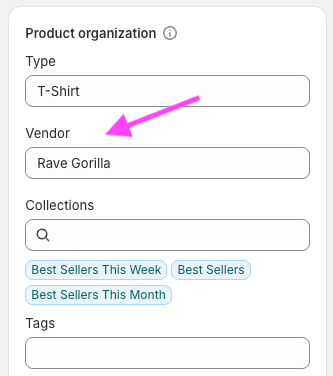
For this automation to work smoothly:
- Every dropship supplier should have a unique Vendor name
- Keep the naming consistent
Order Automator can filter orders based on almost any field you see in the product or order details page, this is what allows the rule to detect which supplier should receive the order.
Step 2: Create a Tag Order Rule
Now we'll build the automation logic.
Create a new rule:
Condition:
Product Vendor equals The Vendor Name
Trigger Event:
New Order
Action:
Add tag The Vendor Name
In app previews:
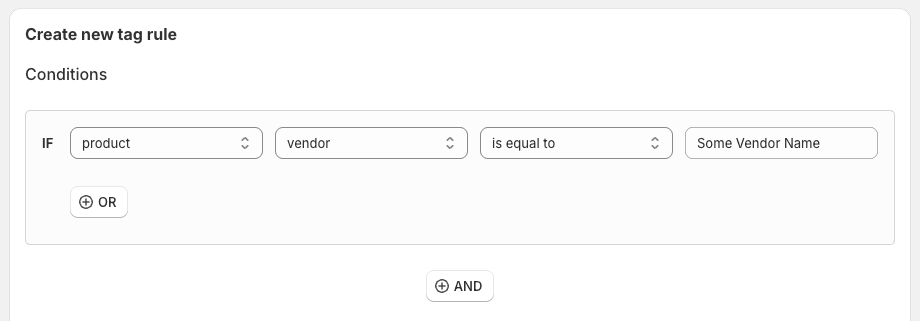
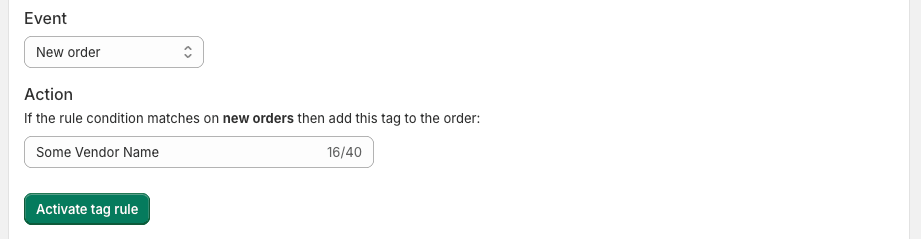
What this does
Every time a new order includes a product from The Vendor Name (whatever you added there), the order is automatically tagged.
Tagging is powerful because it:
- Makes the order easy to identify in Shopify
- Prevents confusion with in-house orders
- Allows additional rules and notifications to trigger
- Creates a clean audit trail
You can repeat this setup for each dropship vendor.
Step 3: Automatically Email the Vendor
Now that the order is being tagged correctly, let's attach a notification.
There are two common approaches.
Option A: Send the Order Instantly (Real-Time Email)
Attach an email notification to the rule by clicking the mail icon next to the tag rule you just created.
Configure it to:
- Send to: vendor@example.com
- Include order number
- Include shipping address
- Include line items
- Include any internal notes if needed
- Only show line items that match the rule condition
Here's what the email template editor looks like:
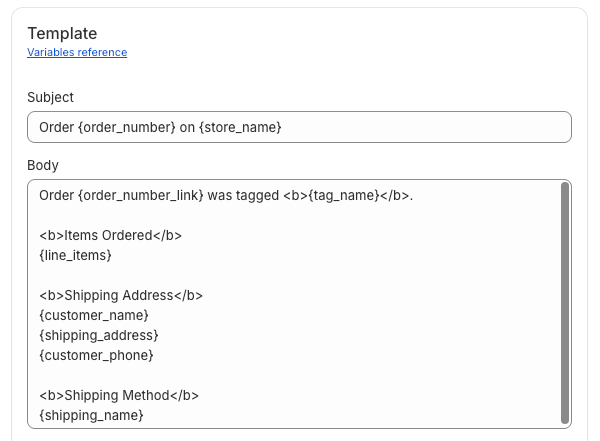
Now, after a qualifying order is placed, the vendor receives the order info automatically.
No manual forwarding required. 👍
This works best for vendors who fulfill orders individually as they come in.
Option B: Send a Daily Summary (Batch Orders)
Some suppliers prefer receiving one consolidated email per day instead of dozens of individual messages.
In this case, use Scheduled Automations.
Set up a daily job:
- Run every day at 9:00am
- Filter orders tagged "The Vendor Name"
- Send a CSV summary to the vendor
This allows the supplier to process orders in bulk.
You can optionally remove or update tags after sending, depending on your workflow.
Advanced Setup: Hybrid Stores (In-House + Dropship)
Many Shopify stores fulfill some products internally and others via dropship vendors.
Here's how to handle that cleanly:
- Auto-tag dropship orders by vendor
- Exclude tagged dropship orders from internal fulfillment rules
- Allow in-house products to flow through your normal fulfillment process
- Prevent duplicate emails or fulfillment attempts
By separating logic based on tags and vendor conditions, you can run both fulfillment systems side-by-side without conflict.
You can use Order Automator to handle all of that if you want.
This is where automation really starts saving serious time. 🚀
Common Mistakes to Avoid
Inconsistent vendor names
Even small differences will break the condition match.
Overlapping rules
If multiple rules trigger on the same order, make sure they don't conflict.
Not testing first
Preview your workflow by setting your own email as the notification recipient.
Why This Matters
If you're manually analyzing and forwarding even 10 orders per day, and it takes just 2 minutes each time, that's:
- 20 minutes per day
- 10 hours per month
- 120 hours per year 😲
Niiiiiiiiiice.
And the bigger your store grows, the more gains you're saving.
Final Thoughts
Dropshipping doesn't have to mean manual order routing.
With a simple Auto Tag rule and a vendor notification, you can:
- Eliminate repetitive admin work
- Reduce fulfillment mistakes
- Improve vendor response time
- Scale without hiring extra operations staff
If you're already using Order Automator, try setting up your first dropship vendor rule today by going to the Auto Tag page in the app.
If you're still manually forwarding orders, check out Order Automator to automate workflows like this.
🧙♂️ If you liked this post check out our flagship app Order Automator.
The goal of Order Automator is to help you and your team save time and create new ways to improve your workflow. Most Shopify stores can benefit from at least 1 feature, even with the Free plan. 👍
About the Author:
Joe's a 10+ years Shopify partner, 7 year Shopify store owner, former Shopify optimization agency owner, creator of Order Automator, co-creator of Product Automator, and has been named a Shopify Expert. Outside of tech he's into nature adventures, travel, trees, music, books, and art. 🏕🌎🌞
Most Popular Posts


Use Cases: How to Improve Your Shopify Workflow with Order Automator
March 7, 2026 (updated)
Originally published: Nov 28, 2024


How to Connect Shopify to Amazon for Automatic Fulfillment Using MCF / FBA
August 16, 2026 (updated)
Originally published: Apr 30, 2024
Recent Posts


How to Connect TikTok Shop to Shopify (US Guide)
Sep 22, 2026


👋 About Us
We make Shopify apps, custom plugins, and automated solutions.
We also have years of experience working with and managing Shopify stores.
Our mission is to save people time so they can focus on what's important in their work, business, and life.
Contact us if you run a Shopify store and would a free workflow audit. 👍
💾 Our Shopify Apps
Use Order Automator to automate order workflows, connect marketplaces like Amazon and TikTok, and increase revenue.
It's customizable, and you can request specific functionality for your workflow.

Product Automator has a small suite of features to help organize your products and collections + increase your conversion rate.
🚚 Automate Fulfillment on Shopify

Using Amazon logistics is a smart way to auto fulfill your Shopify orders.
See our Amazon MCF guide for stats, pricing, tips, and setup instructions.
Order Automator is an official Amazon MCF partner and reviewers say it's the easiest way to connect Amazon and Shopify for fulfillment. If you'd like more info contact us.
👕 Best Print on Demand App

Printful is a free Shopify app that allows you to easily create print on demand products to sell in your store.
We've used it with Shopify stores + our merch and think it's great. ✊
You can sell mugs, t-shirts, bags, posters, and a lot more, without storing any inventory or doing any shipping.
They ship globally and give you a quick way to add merch and accessories to your online store.
Any thoughts?