


Print on Demand + Automated Workflows: The Perfect Way to Increase Sales Without Increasing Costs
 Author: Amanda
💡 What if you could increase sales without increasing your overhead costs? Well, with print on demand, you can.
The challenge for many retail businesses is that scaling revenue usually requires taking on inventory risk: buying customized merch in bulk, paying for storage, and praying it sells. But what top-performing ecommerce businesses already know is that print on demand removes that risk.
Why Print on Demand Is the Ultimate Risk-Free Revenue Add-On
- 💰 Zero upfront cost: You only pay for manufacturing after a customer buys from your site.
- 📈 Instant AOV boost: Easy to offer branded swag, seasonal items, or post-checkout upsells (ex., adding a tote or coffee mug to a main purchase).
- 🧪 Market validation: Ability to test 10 new product designs risk-free. If a design gets zero traction, remove it! No problem. It costs you $0.
Getting Started with Print on Demand
If you're managing a Shopify store, you've probably seen ads for Printful. Printful is a leading print on demand company with over 2 million customers from all industries. Merchants love it for its reliability, easy API integrations, and high-quality printing.
Because Printful operates global fulfillment centers across North America, Europe, and Asia, it's easy to reach your customers with consistent quality and white-label branding. Paired with automated workflows, it turns product expansion into an effortless revenue engine.
Top-Selling Print on Demand Products for Established Brands
Thinking of dipping your toes in the water? Here are some of the top-selling print on demand products other merchants are increasing their sales with:
- 🧥 Unisex premium hoodie: High-quality cotton perfect for vibrant prints, giving it a high-end feel.
- 👕 Heavyweight t-shirts (Shaka Wear / Lane Seven): Thick, boxy tees that easily command $35 - $50+ retail prices.
- 🏆 Heritage apparel: Co-branded Champion hoodies and tees allow brands to piggyback on a trusted brand like Champion.
- 👜 Tote bags & backpacks: Durable totes printed with custom artwork have a high perceived value and are an easy point-of-purchase add-on.
- 🥤 Water bottles & tumblers: Who doesn't need extra stocking stuffers? Stainless steel insulated bottles are a high-margin, practical choice for many brands.

Connecting Printful and Order Automator for Smoother Operations

While Printful handles the printing and shipping, managing custom print on demand orders requires a few extra operations. Here are some of the common challenges sellers run into when adding print on demand, and how Order Automator resolves each one.
💸 Challenge #1: Non-refundable printing fees
Once an order hits Printful's production floor, you are charged for the raw materials and printing. If a customer entered an incorrect address or placed a fraudulent order, you eat that cost.
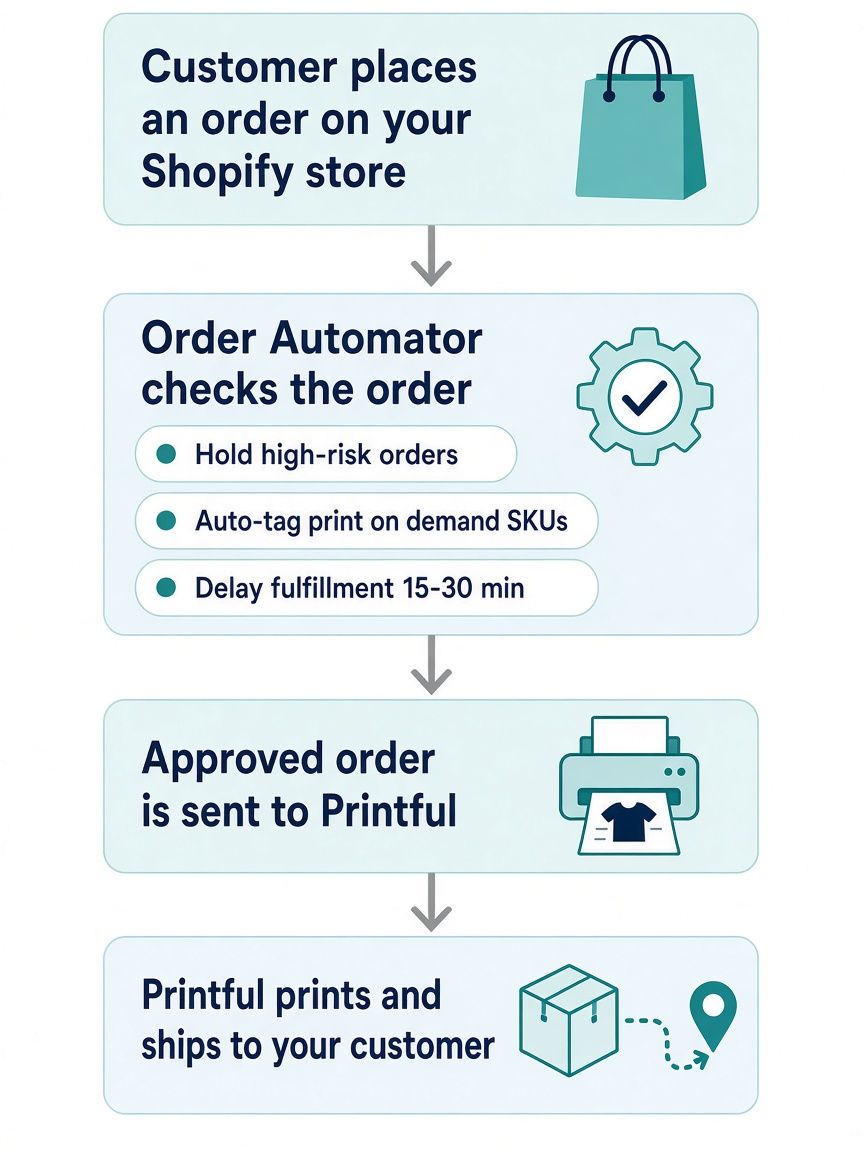
✅ The fix: Order Automator holds high-risk orders, automatically pausing fulfillment requests if Shopify flags potential fraud. This gives your team time to review the order before Printful charges you for printing. (More on this in our Shopify fraud prevention guide.)
📦 Challenge #2: Mixed-inventory orders
When a customer buys a print on demand shirt alongside a product from your warehouse, routing those orders manually creates fulfillment bottlenecks.
✅ The fix: With Order Automator, automatically tag orders containing specific SKUs or custom design tags, making reporting, customer service, and order tracking less confusing.
✏️ Challenge #3: Post-checkout changes and upsells
If a customer wants to add an item or change their shirt size 10 minutes after purchasing, standard fulfillment triggers can push the order to print before the customer can make changes.
✅ The fix: Buffer windows for post-purchase edits and upsells can be set up with Order Automator (for ex., holding orders for 15 - 30 minutes post-checkout) so that customers can edit shipping addresses or accept post-purchase upsell offers without breaking the fulfillment flow.
By sitting between Shopify and Printful, Order Automator adds smart automation rules to your store to improve order efficiency and prevent loss.
How to Set Up Automated Workflows in 3 Easy Steps
Get your Printful products added and start selling more in less than 15 minutes. Here's how:
- 🎨 Install Printful and choose your catalog: Connect the Printful app to your Shopify store, select your products (like premium heavyweight tees or embroidered caps), upload your design files, and publish them to your store.
- ⚙️ Install Order Automator: Add Order Automator from the Shopify App Store to manage your backend order logic.
- 🛠️ Configure your fulfillment rules: Navigate to Order Automations inside Order Automator. Set up rules to auto-hold high-risk orders, apply auto-tags for print on demand SKUs, and establish smart fulfillment delays.
Here's how the order flow works once everything is connected:
Boost Revenue Without Increasing Your Workload
Print on demand is no longer just for drop shippers trying to hustle t-shirts. For established brands, pairing Printful's global, high-quality fulfillment with Order Automator's smart order routing provides the ultimate competitive advantage: new product line expansion, higher AOV, and zero inventory risk, all with bare-minimum added work for your business.
🚀 Start small, then scale
The easiest way to begin? Pick one product your customers already ask for, like a branded hoodie or tote. Add it through Printful, then turn on a fraud hold and a 30-minute buffer in Order Automator.
If it sells, add more designs. If it doesn't, remove it. Either way, it cost you nothing to find out.
🧙♂️ If you liked this post check out our flagship app Order Automator.
Order Automator is a Shopify app that automates workflows, streamlines fulfillment, and helps boost sales. Most stores can benefit from at least 1 feature, even with the Free plan. 👍
About the Author:
Amanda has over 15 years of content marketing and PR experience working with B2B and B2C brands. She's also a published author and former fashion entrepreneur, producing in Thailand and selling to global markets via Shopify and Amazon. When she's not writing, she's traveling or hitting the gym ✈️ 💪🏼.
Most Popular Posts


Use Cases: How to Improve Your Shopify Workflow with Order Automator
March 7, 2026 (updated)
Originally published: Nov 28, 2024


How to Connect Shopify to Amazon for Automatic Fulfillment Using MCF / FBA
August 16, 2026 (updated)
Originally published: Apr 30, 2024
Recent Posts


How to Connect TikTok Shop to Shopify (US Guide)
Sep 22, 2026
👋 About Us
We make Shopify apps, custom plugins, and automated solutions.
We also have years of experience working with and managing Shopify stores.
Our mission is to save people time so they can focus on what's important in their work, business, and life.
Contact us if you run a Shopify store and would a free workflow audit. 👍
💾 Our Shopify Apps
Use Order Automator to automate order workflows, connect marketplaces like Amazon and TikTok, and increase revenue.
It's customizable, and you can request specific functionality for your workflow.

Product Automator has a small suite of features to help organize your products and collections + increase your conversion rate.
🚚 Automate Fulfillment on Shopify

Using Amazon logistics is a smart way to auto fulfill your Shopify orders.
See our Amazon MCF guide for stats, pricing, tips, and setup instructions.
Order Automator is an official Amazon MCF partner and reviewers say it's the easiest way to connect Amazon and Shopify for fulfillment. If you'd like more info contact us.
👕 Best Print on Demand App

Printful is a free Shopify app that allows you to easily create print on demand products to sell in your store.
We've used it with Shopify stores + our merch and think it's great. ✊
You can sell mugs, t-shirts, bags, posters, and a lot more, without storing any inventory or doing any shipping.
They ship globally and give you a quick way to add merch and accessories to your online store.
Any thoughts?